Skip to content
Plush Toy Tech-Pack Guide: From Design Specifications to Production-Ready Files
Turn your plush concept into clear, factory-ready specifications that reduce sampling revisions, prevent costly misunderstandings, and improve production consistency. Backed by 58+ designers and pattern engineers, Pufumi helps brands and IP owners organize technical requirements and translate creative artwork into manufacturable plush products.
Artwork & Dimension Specifications | Fabric & Color References | Embroidery & Construction Details | BOM & Accessory Requirements | Packaging & Labeling Specifications | Sample Approval & Revision Control
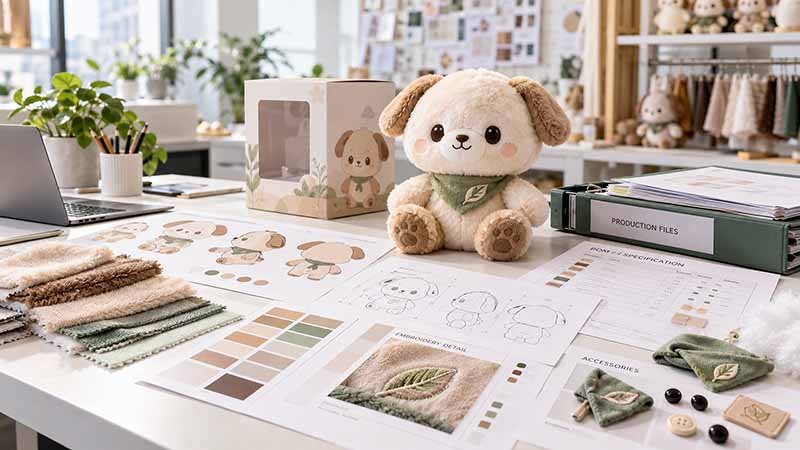
What a Plush Tech Pack Actually Does
Defines Product Intent
Improves Quotation Accuracy
Supports Better Sampling Decisions
Controls Revisions
Supports Production Handover
Protects Repeat Orders
Tech-Pack Needs for Different Brand Teams
IP Owners & Licensees
Toy & Collectible Brands
Game & Entertainment Teams
Retail & Private Label Brands
Agencies & Product Developers
Creator-Owned Brands
Tech-Pack Priorities Change by Plush Product Type

Licensed Character Plush

Mascot Plush

Anime & Game Plush

Collectible & Blind Box Plush

Plush Keychains

Bag Charms

Weighted Plush

Interactive Plush
Plush Tech-Pack Completeness Checklist
A strong tech pack connects appearance, construction and commercial requirements. Missing information does not prevent development, but every unresolved field becomes an engineering assumption that should be identified and approved.
| Tech-Pack Section | Minimum Useful Information | Why Pufumi Needs It |
|---|---|---|
| Product Identity | Project name, SKU, character, version | Prevents file and SKU mix-up |
| Artwork | Front, side, back or approved references | Defines three-dimensional appearance |
| Dimensions | Height, width, depth and key features | Supports pattern, quotation and inspection |
| Colors | Pantone system or approved physical reference | Guides material and thread matching |
| Fabrics | Material type, pile, handfeel or reference | Supports sourcing and product feel |
| Filling | Material direction and firmness | Defines internal handfeel and shape |
| Embroidery / Print | Artwork, size, position and color | Controls surface production |
| Accessories | Size, material, finish and position | Supports attachment engineering |
| Functional Parts | Module, battery, controls and location | Defines internal architecture |
| Labels | Type, artwork, placement and market version | Supports retail and compliance preparation |
| Intended Age | Proposed age / use | Guides structure and requirement review |
| Target Market | Country, channel and launch scope | Guides testing, labels and packaging |
| Packaging | Unit pack, barcode and display direction | Defines retail-ready product configuration |
| Quantity | Total and per-SKU quantity | Supports cost and production planning |
| Approval | Design and sample approvers | Keeps revision decisions controlled |
Provide Enough Artwork to Define the Three-Dimensional Character
A plush toy has depth, volume and a back side. A strong front illustration can define identity, but it cannot answer every engineering question required to create the physical product.
Use Multiple Views to Remove Structural Guesswork
- Front view: The front defines facial expression, eye spacing, body width, limb relationship, costume front and primary color blocks. A centered, neutral pose is easier to engineer than artwork with extreme perspective or overlapping limbs.
- Side view: The side helps define head depth, muzzle projection, chest, belly, body thickness and posture. These areas can change the character dramatically even when the front silhouette looks correct.
- Back view: The back confirms hair, clothing closure, tail position, wings, patterns and label locations. Without a back view, a manufacturer may need to make assumptions that later conflict with the original character design.
- Three-quarter view: A three-quarter reference is useful for understanding volume, transitions and accessories that are difficult to read from strict orthographic views.
- Asymmetric details: If the left and right sides differ, show both. Do not expect production teams to infer an asymmetrical accessory or pattern from one visible angle.
- Turnaround consistency: All views should represent the same character version, proportions, costume and pose. If front and side artwork conflict, the conflict should be resolved before pattern engineering rather than silently interpreted by the sample team.
Pufumi’s development framework treats front, side and back views as separate information layers and recommends an Interpretation Sheet when important views are missing. If only one strong character image exists, Pufumi can propose missing structural interpretations for review before the full physical sample is developed.


Define Dimensions With One Measurement Language
“Make it 20 cm” is not enough when one person measures to the top of the head and another includes ears, a hat or hanging hardware. The tech pack should define exactly where each measurement begins and ends.
Separate Design Targets From Production Measurements
Useful dimensions can include:
- Overall height: State whether ears, horns, hats, hair or hardware are included.
- Body height: Measure the main plush body separately where accessories extend beyond it.
- Maximum width: Identify the widest point in the approved natural state.
- Depth: Head and body depth are important for three-dimensional proportion and packaging.
- Head size: Head width, height and depth can be critical for character accuracy.
- Feature dimensions: Eyes, muzzle, ears, limbs, tail, accessories and logos can need their own values when proportion is important.
- Sitting versus standing height: Specify which condition applies. A seated character should not be quoted or inspected using a stretched standing measurement unless that method is intentionally defined.
- Measurement condition: State whether the product is measured naturally, lightly straightened or in another repeatable condition.
- Target versus tolerance: The design target represents the approved nominal dimension. Bulk production then uses agreed tolerances suitable for the product construction instead of treating every soft unit as a rigid machined object.
Pufumi’s Dimension Brief framework records overall height, body dimensions, depth, feature sizes and measurement conditions so design, quotation, packaging and quality teams use the same dimensional reference. Measurements should be revised when the approved sample changes. Packaging files and QC criteria should not continue using an earlier dimension after the physical product has been updated.
Specify Materials, Colors and Filling Beyond Visual Descriptions
Words such as soft, fluffy or bright blue help explain a direction, but they are not enough to reproduce the same material during sampling and repeat production.
Turn Visual and Tactile Preferences Into Controlled References
- Fabric type:
Identify minky, velboa, faux fur, fleece, sherpa, velvet, printed fabric or another preferred material direction where known. - Pile length and surface:
Hair length, direction, sheen and density can change both appearance and embroidery visibility. Long pile may require local trimming or a different facial treatment. - Handfeel:
If the exact material is unknown, provide a swatch, existing product or reference sample and explain which characteristic matters—softness, stretch, thickness, loft or surface finish. - Color:
Use a complete color reference whenever possible. Pantone references should include the correct system, while final color approval should still use physical fabric, thread or print samples because texture and sheen influence visual perception. - Embroidery thread:
Thread color should be approved separately where facial identity or logos require close control. - Filling direction:
Define soft, balanced or firm feel together with the preferred filling material where known. More developed projects can also specify target weight and zone differences. - Recycled or special material requirements:
State documentation expectations at the beginning so sourcing teams can evaluate appropriate supply options rather than substituting a visually similar material later.
Pufumi’s color-control framework moves from digital references through Pantone and physical material samples to the approved finished sample rather than treating a screen image as the final manufacturing color standard.
A production record should eventually connect the approved material with its actual code or supply reference so future orders do not rely on descriptions such as same soft white fur as before.

Document Embroidery, Printing and Surface Details

Face Embroidery

Logo Embroidery

Printed Pattern

Applique

Transfer & Surface Processes

Local Fur Treatment
Specify Accessories, Hardware and Functional Components

Plastic Eyes & Noses

Clothing

Props

Keyrings & Hardware

Removable Accessories

Electronic Modules
Use a BOM to Turn Design Language Into Purchasing Language
The Bill of Materials connects approved design decisions with the actual materials, components and quantities that production must purchase and issue.
| BOM Field | What It Should Record | Why It Matters |
|---|---|---|
| Part Name | Body fabric, eye thread, ring, label, insert | Makes each component identifiable |
| Material / Component Code | Approved internal or supplier code | Supports repeat sourcing |
| Description | Fabric type, hardware style or component | Gives teams readable context |
| Color | Pantone, supplier color or approved reference | Controls color matching |
| Quantity per Unit | Piece, length, weight or other defined amount | Supports purchasing |
| Placement | Body, ear, clothing, packaging or internal zone | Prevents use in wrong position |
| Approved Supplier / Source | Where project control requires it | Protects material consistency |
| Revision | Current approved version | Prevents outdated parts entering production |
| Supporting Record | Swatch, drawing, certificate or sample | Connects data with evidence |
| Substitution Status | Approved / not approved / project-controlled | Protects change management |
A BOM is not the same as the full tech pack. The tech pack communicates product intent and specifications; the BOM translates approved components into a controlled sourcing structure.

Include Age, Market and Packaging Before the Sample Is Finished
A plush tech pack is stronger when it defines where the product will be sold and how it will be used. These conditions influence engineering decisions that may be expensive to change after sample approval.
Add Commercial Context to the Product Specification
- Intended age:
Record the proposed user age and product use. Age can influence hard components, detachable accessories, internal structures, warnings and testing decisions. - Target market:
Identify specific countries or regions rather than writing only “global.” The United States, European Union, United Kingdom, Canada, Australia and Japan should not automatically be treated as one identical compliance route. - Sales channel:
Retail, DTC, Amazon, theme park, museum or promotional distribution can change packaging, barcode and receiving requirements. - Compliance planning:
The tech pack does not need to reproduce entire toy standards, but it should give the compliance team enough product information to determine the appropriate testing path. - Labels:
Identify expected woven labels, care labels, copyright lines and other approved product information. - Packaging:
State whether the product will use a protective bag, hangtag, retail box, blind box, gift box or other direction. - Barcode / SKU information:
Add confirmed product identifiers when available so artwork and packaging teams work from the correct data. - Launch date:
A fixed retail or campaign date helps the project team plan sampling, testing, packaging approval, production and shipping in the correct sequence.
Pufumi’s Project Brief formally includes design, quantity, materials, cost, market, packaging, compliance, logistics and approval fields so product development is connected to the full commercial program rather than treated as an isolated sample-making task.
What If Your Tech Pack Is Incomplete?
Complete Tech Pack
Partial Tech Pack
Character Sheet Only
Sketch or AI Concept
3D Model or Reference Sample
Move From Tech Pack to Engineering Sample
A tech pack defines the development target, but a soft filled product still needs physical sampling. Fabric stretch, stuffing pressure and three-dimensional shaping cannot be fully judged on a flat document.
Use Sampling to Validate the Manufacturing Interpretation
A controlled development path can follow:
- Asset Review
Pufumi reviews artwork, dimensions, material references, quantity, target market and packaging information. - Clarification List
Conflicting or missing information is collected before the sample team makes irreversible assumptions. - Engineering Interpretation
Digital or illustrated features are translated into fabric panels, seams, embroidery, filling zones, clothing, accessories and internal structures. - Pattern Development
Paper patterns convert the approved interpretation into cuttable and sewable parts. - V1 Sample
The first physical sample tests proportion, expression, materials, structure and general product direction. - Review
The project team compares V1 with the approved design and records specific changes rather than using vague feedback such as “make it more accurate.” - Revision
Pattern, embroidery, filling, materials or accessories are adjusted according to the review record. - Approved Sample
Once appearance, structure and agreed commercial requirements are approved, the product can move toward production preparation.
Pufumi commonly plans around 7–12 working days for regular plush samples once the necessary files and material direction are ready. Complex projects can require around 12–20 working days, depending on structure, accessories, material development and revision requirements.
A tech pack reduces avoidable uncertainty, but it does not remove the need for prototype validation.


Control Revisions With Clear Versions and Approvals
Sample development changes the product. Every approved change should update the relevant specification instead of leaving the team to choose between old files, email comments and physical samples.
Keep One Clear Source of Current Project Information
A useful revision structure can record:
- Revision number:
Use a defined sequence instead of filenames such as “Final,” “Final New” and “Final 2.” - Revision date:
Make it clear when the update entered the project. - Change description:
Record exactly what changed—head width, eye position, fabric, accessory size, filling, packaging or another item. - Reason:
Where useful, note whether the change came from character approval, manufacturing feasibility, cost, safety, material availability or packaging fit. - Approval status:
Separate Proposed, Under Review, Approved and Released information. - Approved by:
Identify the correct decision maker for character, packaging or other specialist approvals. - Affected documents:
A head-size change may affect pattern, measurements, packaging and product photography. A hardware change may affect BOM, attachment instructions and safety review. - Sample reference:
Connect the revision with the physical sample or photograph being approved.
Pufumi’s Project Brief is not treated as a one-time form. Changes to dimensions, materials, packaging, quantity, market or dates are managed through updates or formal change records during development.
For a four-character collection, for example, separate embroidery and accessory revisions should remain tied to the correct SKU instead of being communicated as one general message for the entire range.
Convert the Approved Tech Pack Into a Production File Package
The file sent at the beginning of development and the file used to control mass production should not always be identical. Sampling creates manufacturing information that did not exist in the original concept.
Use the Approved Product to Build the Manufacturing Baseline
After final sample approval, Pufumi can consolidate the project into a production-oriented file package.
Typical records may include:
- Approved artwork: The final character and branding assets associated with the released SKU.
- Final dimensions: Measurements taken from the approved product using the agreed measurement method.
- Pattern version: The production pattern derived from the approved sample.
- BOM: Released fabrics, filling, trims, hardware, labels and internal components.
- Material references: Approved swatches, supplier codes, colors and other sourcing information.
- Embroidery files: Production programs or approved embroidery artwork linked to the correct panels and SKU.
- Print files: Released artwork, placement and relevant production references.
- Filling specification: Material, firmness, weight or zone instructions where required.
- Accessory specification: Dimensions, finish, orientation, attachment and assembly instructions.
- Assembly notes: Critical sewing, turning, closing, positioning or functional steps that production needs to reproduce.
- Golden Sample: The approved physical reference for appearance, handfeel and overall construction.
- QC criteria: Product-specific visual, dimensional, functional and packaging checkpoints.
- Packaging files: Approved structure, artwork, barcode, label and pack-out information.
- Change-control record: A clear history of approved modifications and the current released version.
The principle is simple:
The client tech pack starts development.
The Production File Package controls production.
Pufumi’s manufacturing framework uses the final Golden Sample, BOM and approved project files as the baseline for bulk production and later repeat-order comparison rather than relying only on the earliest design document.

Frequently Asked Questions About Plush Tech Packs

Trust, Compliance & Production Assurance
Confidence for global brands and complex plush programs
Pufumi evaluates each project according to its target market, age grade, materials, construction, labeling, and packaging requirements. Depending on the assigned production site and project scope, our team can support ISO 9001 quality-management documentation and coordinate testing to EN71, ASTM F963, CPSIA, REACH, and other applicable standards. Factory audits, certifications, and test reports are verified by issuing body, validity period, facility, and product scope, giving brands greater transparency from sample development through controlled production and delivery.














Review Your Plush Tech Pack
Send Pufumi the files you already have. A project can begin with a complete tech pack, partial specification, character sheet, 3D model, sketch, reference sample or approved artwork.
Useful inputs include:
- Project or character name
- Front, side and back artwork
- 3D model or turnaround if available
- Target product size
- SKU quantity
- Order quantity
- Material or handfeel preference
- Pantone or brand color information
- Filling direction
- Embroidery or printed details
- Clothing and accessories
- Hardware or electronic functions
- Intended age
- Target sales markets
- Packaging direction
- Launch date
- Existing physical reference sample
Pufumi will first identify what is already production-useful, what needs clarification and what still requires engineering interpretation. A complete tech pack can move directly into a deeper manufacturability review, while early artwork can be converted into a structured development brief before pattern work starts.
The objective is not to make the longest document possible. The objective is to give design, sample, sourcing, production, quality and packaging teams one controlled understanding of the product—and then update that information as the physical sample becomes the approved manufacturing standard.